SHIFT SOLVE vs Equation Mode: Why One Root Isn't All
On an fx-991ES PLUS-style sci cal, SHIFT SOLVE and a quadratic equation mode answer different questions. See a two-root example tested on CalcES and the limits Casio documents.
You enter a quadratic on a familiar sci cal and use SHIFT SOLVE. The screen gives one value for . Your classmate has two. Did one of you make a mistake?
Maybe neither did. The key question is whether you asked the calculator to find a solution near a starting value or to list the roots of a quadratic. Those are different jobs. This matters to anyone looking for a scientific calculator with SHIFT SOLVE: having that key alone does not promise a complete answer to every equation.
We read Casio's SOLVE and EQN mode documentation for the fx-991ES PLUS family, then ran the example below on CalcES on 25 September 2026. CalcES is made by MathDa, which publishes this Journal. The photo shows a real CalcES result, not an emulator capture of Casio firmware.
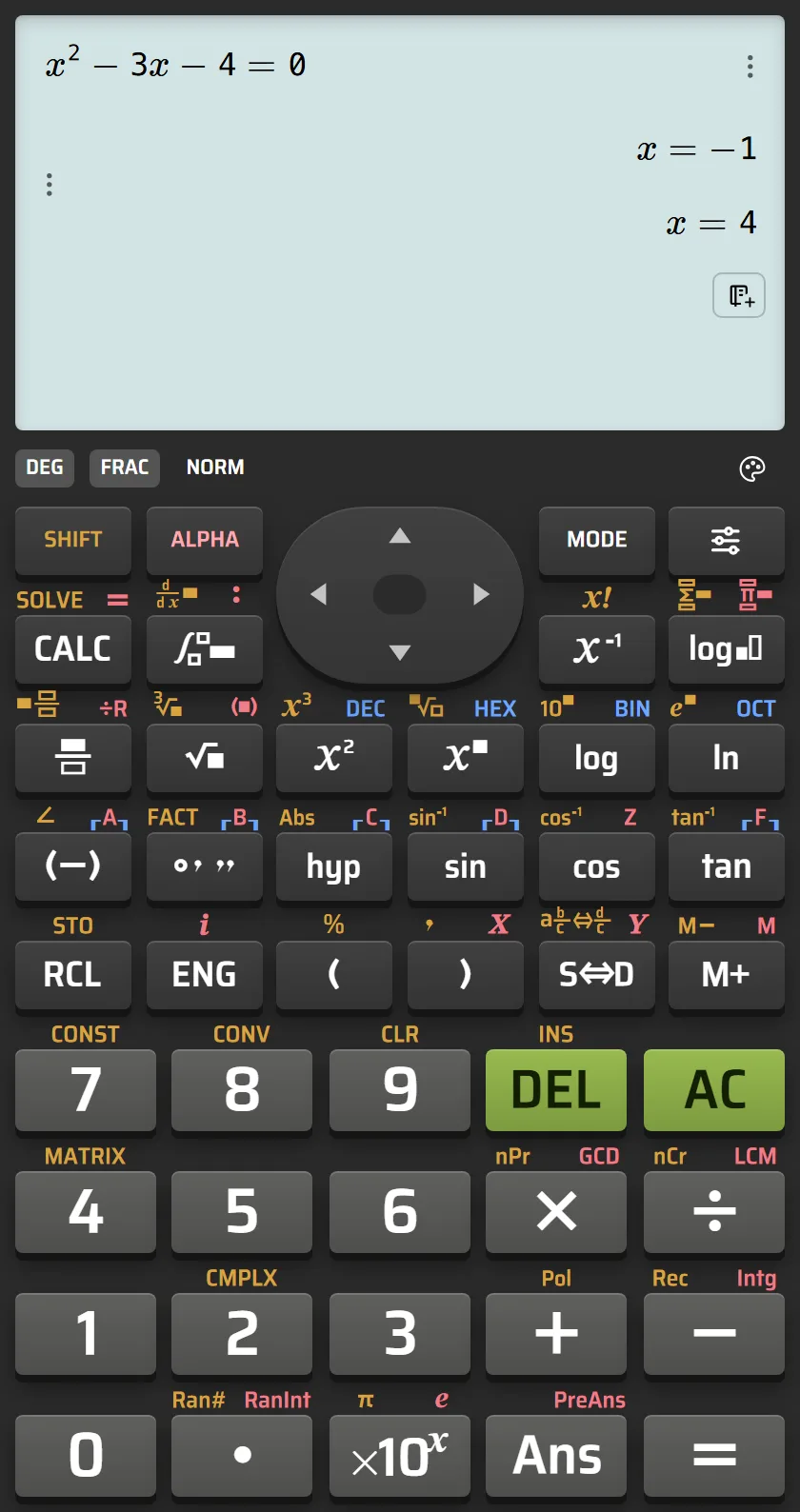 Live CalcES calculation on the ES PLUS-style keypad: x²−3x−4=0 returns x=−1 and x=4.
A two-root problem with a one-root trap
Take . It factors as , so the solutions are and . Put either back into the original expression and it becomes zero. The screenshot shows both on CalcES after entering the complete equation with its ES PLUS-style keypad.
Casio's manual says SOLVE uses Newton's method: it starts from an initial value and works toward a solution. The manual explicitly warns that only one solution is returned even when several exist, and that some starting values may fail to find one. It also says SOLVE results are displayed as decimals. One displayed root can therefore be correct and still be only part of the mathematical answer.
Casio's separate EQN mode includes quadratic equations and lets the user view the solutions. That is the more appropriate Casio route when an assignment asks for all roots of a polynomial of supported degree. This is an editorial comparison of what the modes are for; the exact key sequence belongs in the calculator manual or a product Guide.
Why checking the first answer matters
For , the left side is ; for , it is . Those substitutions establish that both numbers solve the equation. They also show why stopping at one correct output is risky: “correct” and “complete” are different standards.
The starting value in a numerical solve routine is a clue, not a guarantee about which root you will see. Casio's documentation says the method can return one solution or fail to converge for some starting values. If you need a complete quadratic answer, factoring or the dedicated equation mode is a more direct check than repeatedly trying guesses until two numbers appear. If the question involves a real-world quantity such as length, first find the mathematical roots, then explain why a negative value may be excluded.
When a single solution is actually enough
A one-root solver is useful when a problem has a practical constraint. Suppose represents a length and the same equation arises from a physical setup. The negative root may not describe a possible length, while does. In that case you still want to know both mathematical roots before explaining why only one fits the context.
The danger is not the solver's method. It is mistaking its output for a complete list. A good habit is to ask what the question requires:
| The question says… | What to check |
|---|---|
| “Find a value of ” | A numerical solver may be enough; substitute the result to check it |
| “Find all solutions” | Use a polynomial or equation mode that reports every root, then verify the set |
| “Explain why” | A number alone is insufficient; factor, use the quadratic formula or inspect worked reasoning |
| “Which answer makes sense here?” | Interpret the roots in the original situation, including units and constraints |
What the online sci cal adds
CalcES lets fx-991ES PLUS and fx-570ES PLUS users begin on an ES PLUS-style keypad. For the tested equation, its calculation service returned both and on the screen shown above. That is a useful check while studying, but it does not mean CalcES is Casio software or duplicates Casio's SHIFT SOLVE algorithm. It is an independent MathDa calculator.
For supported problems, CalcES can also pass the result to worked steps or a graph. The graph of would cross the horizontal axis at and ; the factorization tells you exactly why. If the assignment asks for a method, those views are more informative than simply collecting a number. Availability of worked steps depends on the problem.
The takeaway is simple: SHIFT SOLVE can answer “where is one solution?”; quadratic equation mode answers “what are the roots?” Choose the tool to match the wording of the problem. If you want to check this example yourself, open CalcES. For a broader choice of online sci cals with familiar keypads, read our Philippine comparison.
Frequently asked questions
Why did SHIFT SOLVE show only one root?
Casio says SOLVE uses Newton's method and returns one solution even when an equation has several. The starting value can affect which solution it finds or whether it converges.
Is one root from SHIFT SOLVE wrong?
Not necessarily. Substitute it into the original equation. It may be a valid root but still be an incomplete answer when the question asks for every solution.
Does CalcES use SHIFT SOLVE to show both roots in the screenshot?
No. The screenshot shows a complete quadratic equation entered on CalcES's ES PLUS-style keypad and evaluated by its calculation service. It is not a capture of Casio's SHIFT SOLVE routine.
Related articles
- 8 Best Scientific Calculators Online for Casio Users
Compare eight online sci cals for fx-991ES PLUS and fx-570ES PLUS users: familiar-style keys first, then exact answers, worked steps and graphs.