Solve a quadratic inequality and read its solution set
Enter the coefficients, choose the relation, and identify the intervals that satisfy it.
Artikel ini belum tersedia dalam bahasa Melayu. Versi bahasa Inggeris yang lengkap dipaparkan.
Finding the two boundary values is not enough when a problem asks for the set of values that satisfy an inequality. Use Inequality mode for this example:
Put the expression on the left and on the right before identifying the coefficients. In descending power order, they are , , and . Inequalities of degree 3, 4 and 5 are solved the same way; the last section shows how.
Solve it on the calculator
Below each step is the screen you should see after pressing.
Next to each step is the screen you should see after pressing.
-
Step 1
Open the mode menu and choose Inequality → Solve inequality (degree 2). > is already highlighted at the top; to solve a different relation, tap its sign there.Press: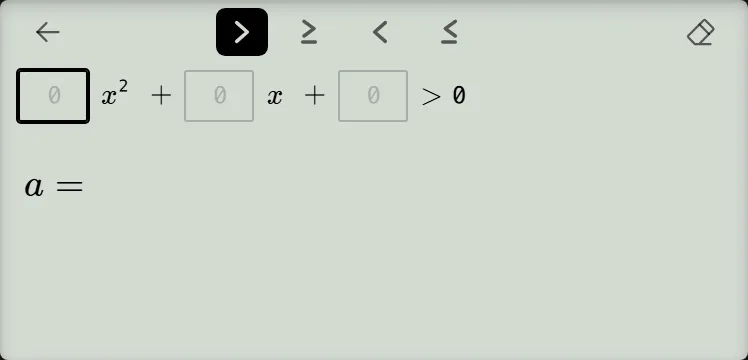
-
Step 2
Enter , , and in order. Press the equals key after each coefficient to advance; pressing it after solves the inequality. The display shows three lines: , , then the solution set in interval notation.Press: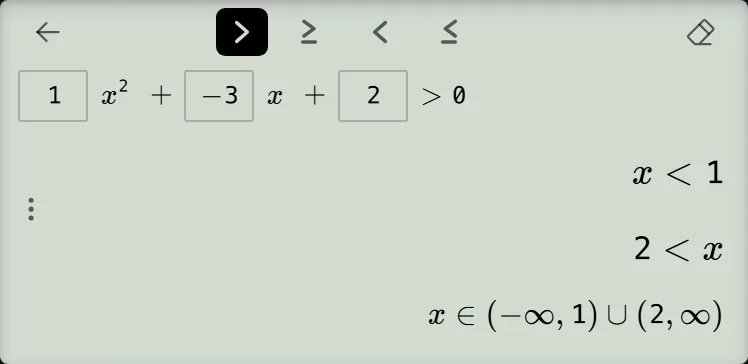
Read and check the result
The first two displayed lines mean or, not and:
The third line gives the same set in interval notation, the form a problem usually asks for:
Neither nor is included because the problem uses rather than . As a quick check, and each give on the left, while gives . If your problem uses another relation, tap its sign at the top before solving; these intervals are specific to the example.
Solve inequalities of degree 3, 4 or 5
Open the mode menu, choose Inequality, then choose Solve inequality (degree 3), Solve inequality (degree 4), or Solve inequality (degree 5).
Degree 3 gives four coefficient boxes, degree 4 gives five, and degree 5 gives six; the degree-5 row scrolls sideways. Enter coefficients from the highest power to the constant, pressing equals after each box; the last press solves. Choose , , or in the strip at the top; is selected by default.
For , enter : the screen shows , then , then . The first two lines mean or.
Degree 4 or 5 can show up to three interval lines, followed by the interval notation. For , enter : the screen shows , , and , followed by . A solution can also include an isolated point such as ; a long interval line scrolls sideways inside its own box.
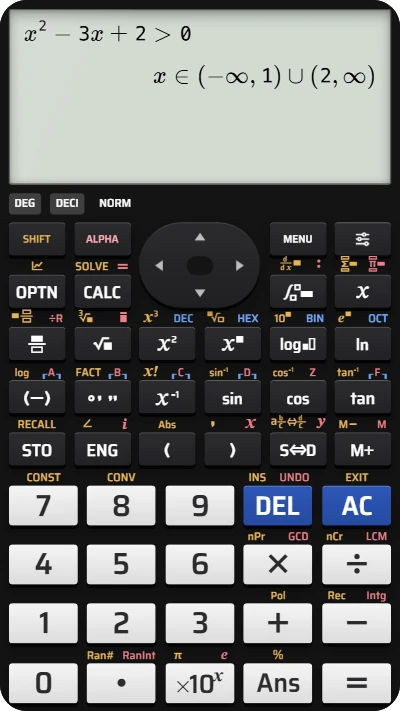
Solve a quadratic inequality on your fx-991EX calculator
Enter x² − 3x + 2 > 0 and read the solution intervals directly on the screen — it takes only a few seconds.